Most SECS/GEM problems on a new tool are found by the first fab that connects to it. That is the most expensive place to find them: the tool is on a customer floor, the qualification clock is running, and every fix is a software release shipped across the world.
This post is for the people who build equipment. It walks through the faults that most often get as far as a customer, how to catch each one on your own bench, and where a self-check stops being evidence.
Why the faults survive your own testing
An equipment team usually tests its GEM interface against one host: the one it wrote, or the one its first customer used. Both are forgiving in the same ways the tool is. A host that never sends an unexpected message will never find out what the tool does with one.
Fabs do not run that host. They run their own, written against their own reading of SEMI E30, and the gaps between the two readings are where the integration time goes.
The faults that most often get through
Silence instead of an error
When a tool receives a stream, function or device ID it does not support, E30 expects it to say so with a stream 9 message: S9F1 for an unknown device ID, S9F3 for an unknown stream, S9F5 for an unknown function, S9F7 for data it cannot parse. A tool that stays silent instead leaves the host waiting the full T3 reply timeout, 45 seconds by default, before it can conclude anything. Multiply that by every message a host tries during discovery and a first connection takes minutes and looks broken.
The session rules in HSMS
SEMI E37 says a tool must reject data sent before the session is selected, and must answer a control message type it does not recognise with a Reject.req. Hosts that behave never trigger either rule, so tools that break them pass every friendly test. The first host that reconnects quickly or probes the link finds out.
Control state that does not hold
Asked to go off-line, a tool should then refuse ordinary primaries with an SxF0 abort until it is asked back on-line. A common fault is a tool that acknowledges the request and carries on answering everything, which makes the control state a label rather than a state.
Constants, clocks and formats
Equipment constants that accept any value, including ones outside their own limits. A clock that reports a time format E5 does not allow. Status variables that answer an unknown ID with data instead of an empty item. Each is small, and each breaks a host that trusts what it is told.
The optional parts that are claimed but not there
Trace data collection that accepts the setup and never sends samples. Spooling that accepts streams it should refuse. Alarm enables that change nothing. A tool’s manual says what it supports; the interface is what it actually does.
How to catch them on the bench
The method is not complicated. Connect to the tool as a host that is deliberately strict, send it the messages a friendly host never sends, and record every byte of the exchange.
That is what FabConnect Verify does. It connects as the host over HSMS, or over SECS-I on a serial port, and runs a suite of 53 cases, 40 for HSMS and GEM plus 13 for GEM300:
- 4 HSMS cases: select and linktest, plus two that need frames a well-behaved host never sends, an undefined control message type and data before select
- 7 discovery probes that ask the tool what it has: identity, status and data variables, collection events, equipment constants, alarms and recipes
- 29 GEM cases across communication, control state, error handling, status data, constants, clock, remote commands, terminal services, event reports, alarms, trace, process programs and spooling
- 13 GEM300 cases, run only when asked for: 8 for E40, E87, E90 and E94, and 5 experimental, passive E116 EPT cases that only watch the Idle/Busy/Blocked reports the tool sends on its own (--ept runs them alone, with no state-changing option). Updated 15 October 2026: the E116 cases are built from SEMI’s published E116 metadata files; not yet checked against the standard text
By default a run only reads. Cases that change the tool’s state, such as taking it off-line or writing a constant, run only when the operator allows them. Each one puts back what it changed where the tool lets it read the old value (spooling is left off, because E30 gives no way to read the earlier setting), and says so in the verdict if it could not.
What the report contains
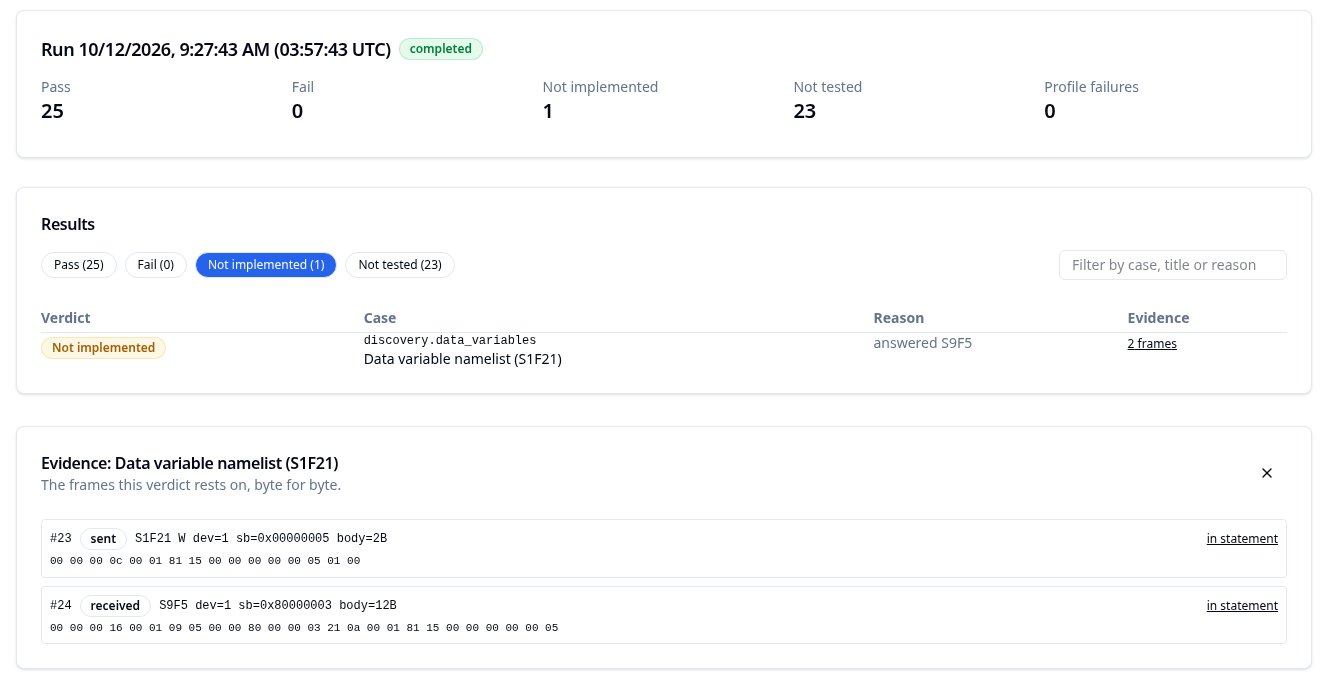
Every verdict is one of four: passed, failed, not implemented (the tool answered S9F3 or S9F5, the standard way to say it does not support a message), or not tested. An abort (SxF0) from a tool that is off-line to the host is reported as not tested, not as missing. A failed verdict says what was expected and what arrived, for example “no reply within T3; a tool that does not support a message must answer S9F5, not stay silent”.
Each verdict cites the frames it rests on. The report keeps every frame with its timestamp, direction and bytes (a frame over 64 KiB keeps its first 64 KiB plus its full length and SHA-256; over SECS-I the frames are the reassembled messages, not the ENQ/EOT block traffic), and the HTML version links each verdict to the exact messages behind it. A reviewer who doubts a verdict reads the exchange, not our summary of it.
Reports carry SHA-256 fingerprints: record the fingerprint when the report is handed over, and any later copy can be checked against it. A licensed copy also signs them. A build that trusts FabConnect’s development root key, such as the demo, marks its reports “development build”.
How we know the cases are right
A test that never fails proves nothing, so we break our own simulator on purpose. It has 38 deliberate faults, from a tool that never sends stream 9 to one whose trace setup produces no samples. For each of the 21 GEM and HSMS faults, an automated test checks that a run fails exactly the cases meant to catch it, and no others; one more keeps the tool busy for the idle rule, and the GEM300 and EPT cases each have faults of their own.
The suite also runs against secsgem, an independent open-source GEM implementation we did not write. That run found bugs in our tester, which we fixed, and gaps in secsgem, which the report shows as failures.
What a self-check is not
It is not a certification. No SEMI-run certification programme for GEM exists. The report says what it is: a check against our own test cases.
A signature proves less than people assume. It shows which licensed copy produced the report and that the report has not changed since. It cannot prove the run happened as described, because the signing key sits with the licensee.
It has been proven on software, not on production equipment. The cases pass on our simulator, the ones that judge behaviour fail on its broken variants, and the suite runs against secsgem. The first customer run will also be the first run against physical equipment, and we are explicit about that in how we price it.
Even so, a report that shows the raw exchange is a better thing to hand a fab’s integration team than a line in a manual saying the tool is GEM compliant. It turns the first conversation from “does it work” into “here is what it does”.