Walk the floor of an OSAT or a fab running 150mm and 200mm equipment and you will find tools whose only host interface is a 9-pin serial port. They were built before HSMS existed, they still run, and nobody is going to replace a working tool to get an Ethernet port.
Those tools speak SECS-I, SEMI E4. This post explains what that means for connecting them, and where FabConnect stands with it.
Same messages, different wire
SECS-II, the message layer, is the same on both. An S1F13 is an S1F13 whether it travels over serial or Ethernet. What changes is the transport underneath:
| SECS-I (E4) | HSMS (E37) | |
|---|---|---|
| Medium | RS-232 serial, point to point | TCP/IP |
| Speed | Typically 9600 baud | Network speed |
| Unit of transfer | Blocks of up to 244 data bytes | Whole messages |
| Integrity | 16-bit checksum per block, acknowledged | TCP |
| Who may send | One side at a time, by handshake | Either side, any time |
How a SECS-I exchange works
Before sending, a side sends ENQ and waits for the other to answer EOT, meaning “go ahead”. It then sends a block: a length byte, a 10-byte header and up to 244 bytes of data, followed by a two-byte checksum, and waits for ACK. A NAK or silence means a retry, three by default. A long message is split into numbered blocks, each with its own handshake and acknowledgement.
Four timers govern it. T1 is the gap allowed between characters (0.5 s by default), T2 the wait for each reply in the handshake, EOT or ACK (10 s), T3 the wait for a reply message, and T4 the gap allowed between blocks of one message (45 s).
When both sides raise ENQ at once, one has to give way. E4 decides that by a master and slave setting, with the equipment normally the master so the host gives way, and getting it wrong is a classic source of a link that works until both sides get busy at the same time.
What this means in practice
Volume. At 9600 baud a serial link moves under a kilobyte a second. Status, alarms and events fit comfortably. High-rate trace collection does not, and a plan that assumes it will is a plan that fails at bring-up.
Distance. RS-232 is meant for short cables. The tool’s serial port has to reach something on the network, which is where converters come in.
Settings. Baud rate, device ID and the master/slave choice must match what the tool is set to. These are usually in a service menu, and the person who knows them is often the vendor’s field engineer.
Converters
A tool’s serial port normally reaches the host through one of two things: a USB serial adapter on a nearby PC, or a serial device server that puts the port on the network.
FabConnect opens a serial port as a local device, /dev/ttyUSB0 on Linux or COM3 on Windows, at 8 data bits, no parity, one stop bit and no flow control. Software flow control is ruled out because it would corrupt binary block data. A USB adapter works as it is. A network device server can be reached directly, in either of the two modes most of them offer: raw TCP, where the server passes bytes straight through and its baud rate is set in the server’s own configuration, or RFC 2217, where FabConnect sets the baud rate and line format itself over the connection. A vendor’s virtual-COM driver works too, since it presents the remote port as a local one.
Where FabConnect stands today
This is the part we would rather state plainly than have you discover.
Built and tested end to end:
- The SECS-I link: blocks, checksums, retries, multi-block messages, the T1, T2, T3 and T4 timers, and line contention, with the host giving way by default or keeping the line when it is set as master.
- Requests and replies: the host’s requests to a serial tool, matched to their replies, through the same API as an HSMS tool.
- Alarms, collection events and trace data sent by a serial tool reach the same live feeds as HSMS, and are acknowledged the way E30 expects.
- Link status. SECS-I has no select handshake, so FabConnect uses the step GEM itself defines: the tool counts as communicating once it accepts S1F13, Establish Communications. If it refuses or does not answer, or the port fails, the console says so and why, and FabConnect asks again or reopens the port.
- Three ways to the port: a local serial port, a device server in raw TCP mode, or a device server over RFC 2217.
- Console set-up: a form for serial tools, with the port or device server, baud rate, device ID, master or slave, and the E4 timers.
- FabConnect Verify over all three, from the command line and from the operator console. A console run lets go of the port, runs the suite over the same line with the tool’s own settings, then reopens the port and establishes communication again, however the run ends.
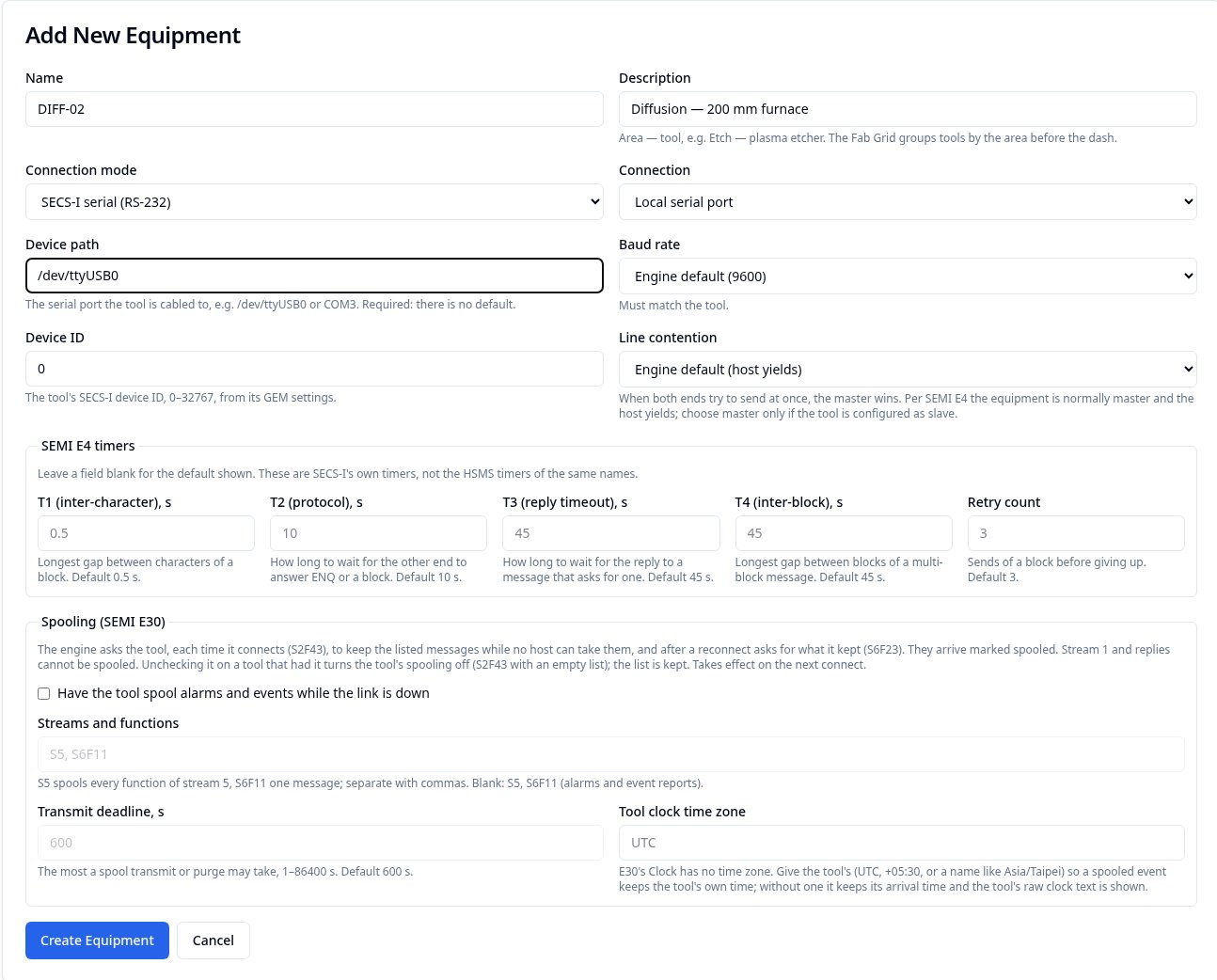
Tested how: against our simulated tool’s serial side, through pairs of pseudo-terminals that exercise the operating system’s real serial layer, and through test device servers speaking raw TCP and RFC 2217. A pseudo-terminal does not pace bytes at the line rate, and on serial Verify reports its four HSMS-only cases and the two spooling cases that need a dropped link as not tested. It has never run on a cable, a real device server, or against a physical tool. Signal levels, cabling, real line timing, a real device server’s quirks, and the quirks of a real tool’s serial firmware are untested.
What to do with a serial fleet now
Inventory first: which tools are serial-only, at what settings, and through what converters, if any. That inventory is part of a readiness assessment, and it is worth having whatever you decide about software, because it tells you which tools can deliver the data your plans assume.
For the tools that matter most, ask the vendor whether an HSMS option exists for that platform. Where one does, it removes the speed limit above, and the open question of how a twenty-year-old serial implementation behaves on its first cable.