Connecting a new tool type starts with its SECS/GEM interface manual. Someone reads it, page by page, and types the status variable ids, the collection events and the variables their reports carry, the alarm ids, the equipment constants with their limits, and the remote commands with their parameters into the host. It is slow, and a mistyped id stays hidden until a report comes back wrong.
FabConnect 0.8.0 adds the integration copilot to FabConnect Assist. An engineer gives FabConnect the manual, and a model running inside your network drafts that setup. The engineer reviews every drafted item before anything is saved. This post covers what it drafts, how the draft is checked, and what it never does.
What it drafts
On the Library page, Draft from manual takes the manual as a PDF or as text, for a tool type or for one tool. A background job reads it about a page at a time and drafts:
- status variables, with their ids, names, units and formats;
- collection events, with the variables their reports carry;
- alarms, with their text and severity where the manual states it;
- equipment constants, with their units and limits;
- remote commands, with their parameters, types and ranges.
Each item keeps the page or section it came from, so the reviewer can open the manual at the right place. The job shows its progress, can be cancelled, and keeps what it drafted so far.
How the draft is checked
A model can misread a table, so the draft is checked against the records FabConnect already holds, and the checks are shown beside each item:
- Against the SEDD. Where a SEDD is imported for the tool type, each item is marked as agreeing with it, differing from it, or not in it. (The SEDD import is built from SEMI’s published E172 schema files; not yet checked against the standard text.)
- Against what the tool reported. Where a FabConnect Verify run has discovered the tool over GEM, each item is marked as seen or not seen. A kind of item the run never listed is marked not discovered, rather than not seen.
- Against a schema. Every item the model returns is validated by the gateway. Anything malformed is dropped, and the count of dropped items is shown.
These checks use stored data only. The integration copilot never asks the tool anything.
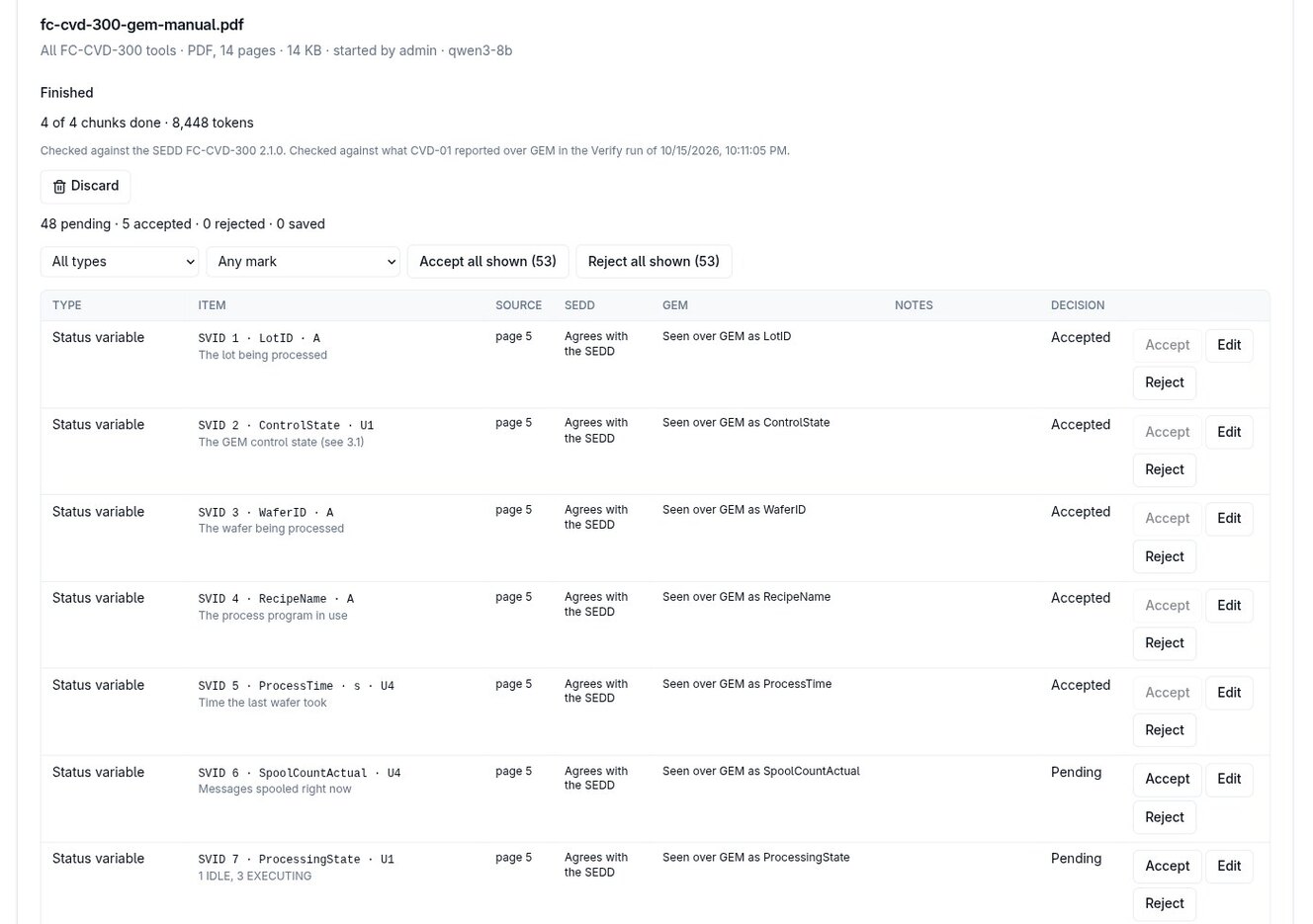
A person decides what is saved
The engineer accepts, edits or rejects each item, then saves the accepted ones. Remote commands go into the command library, flagged for a second look before anyone sends them. Everything else goes into the tool library as a new version of the tool type’s interface dictionary. A command the library already holds is never replaced by default: the review shows it, and the engineer chooses whether a new version replaces it.
Nothing is saved without a person accepting it, and nothing is sent to a tool. The model drafting from the manual is given no tools at all: text in, structured items out. So text in a manual cannot make FabConnect do anything except propose items for review.
When a Verify check fails
On a failed check in a FabConnect Verify run, Explain this check drafts four things from the run’s stored evidence: what the check expected, what the recorded messages show the tool did, citing those messages, the likely gap in the tool’s GEM interface, and a question to send the tool’s vendor. The cited messages are checked against the records actually read.
Where the model runs
The integration copilot uses the model endpoint your site configures. In release mode, FabConnect refuses an endpoint outside your network unless an administrator explicitly allows it. The manual’s text is stored per organisation, size-capped, and deleted when the draft is discarded. The audit log records each upload, job, review and save, but never the manual’s text or the model’s output.
The integration copilot is off until an administrator enables it, and drafting needs the assist:draft permission, which the engineer role has and the operator role does not.
The label
FabConnect Assist: drafted by an AI model from the documents and records you provide; review every item before saving. Tested with Qwen3-8B against FabConnect’s simulated tools and sample manuals. Those sample manuals were written for FabConnect’s own simulated tools; a vendor’s manual has not yet been tried, and, like the rest of FabConnect, the integration copilot has not yet run in a production fab.
The docs page has the details, and sales@fabconnect.io answers questions.