A recipe change that goes wrong rarely goes wrong in the recipe editor. It goes wrong in the copy: the file on a shared drive that was not the latest, the tool that was missed when the change went to the other five, the edit made on the tool’s own screen that nobody wrote down. The scrap shows up later, and the first question in the review is which version the tool was actually running.
This post is about the host side of that problem: what the host can know about the recipes on its tools, and what it can stop. It describes FabConnect’s recipe library, and where it stops.
The messages underneath
In SECS/GEM a recipe is a process program, identified by a PPID, and stream 7 moves it. The host asks permission to send with S7F1 and the tool grants or refuses in S7F2. The host sends it with S7F3 and the tool acknowledges in S7F4. S7F5 asks the tool for a copy of a program it holds, and S7F19 asks for the list of what it holds. That is enough to send, fetch and compare, which is all the library needs.
Kept versions
Each recipe in the library is named by its PPID and kept as numbered versions. Saving a change adds a version; it never rewrites one, and each version records who made it and when. A version can be typed in, loaded from a file, or uploaded from a tool with S7F5, in which case it records which tool and when. A binary recipe is kept as it came and sent back unchanged.
A recipe can belong to a tool type, to one tool, or to the whole site, so an etch recipe is only offered for the tools it is meant for. Any two versions can be compared: text line by line, with the change in context, binary by the offset of the first difference, and both with sizes and SHA-256. The comparison also says when the only difference is line endings, which is a surprisingly common cause of a recipe that “looks the same” and is not.
A golden version, and checking against it
An engineer can mark one version of a recipe as golden: the one the tools are supposed to be running. Marking and clearing it are both audited.
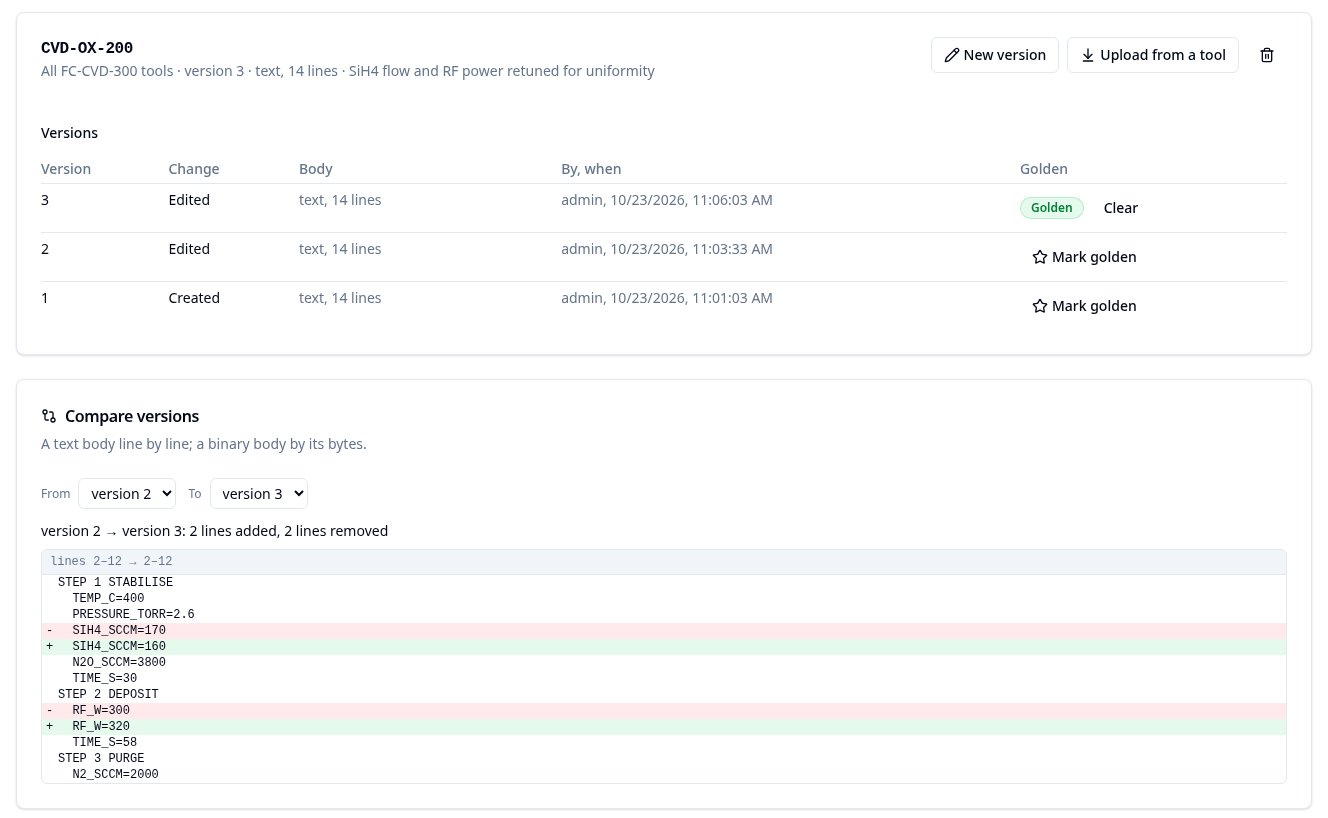
The golden check then asks each tool the recipe applies to for its copy, with S7F5, and compares the bytes with the golden version. Each tool comes back as one of four: matches, differs (with the difference shown), missing (the tool does not have that PPID), or no answer. The comparison is byte for byte, so a recipe with a changed parameter, a trailing space or different line endings shows as different. Reading a recipe changes nothing on the tool.
Today the check runs when someone asks for it, up to 50 tools at a time. It is not scheduled, it does not run itself before a send, and a mismatch does not raise an alarm. If you want a mismatch to page someone, that is the next thing to build, not something already there.
Approval before a send
Many quality systems already require a second person to approve a recipe change. The weak point is usually that the approval is on paper and the send is not connected to it.
With approval switched on for a site, a request names a specific version and a specific list of tools. Someone with recipe-editing rights approves or rejects it, and the gateway and the database both refuse an approval by the person who asked. The requester then sends it, once, before the approval expires (four hours by default, configurable from five minutes to seven days). What was approved is exactly what is sent: the same kept version to the same tools, checked again at send time.
While approval is on, the gateway refuses every other way of changing a tool’s recipes: sends and deletes through the REST API, GraphQL, or any other path through the gateway. Reading recipes from the tool is still allowed. Every request, decision and send is in the audit trail, and the runtime database account cannot delete the approval records. The way around it is for someone with settings rights to turn approval off, and that change is audited too.
Approval is off by default, because not every site wants it on every recipe change. A site that does turns it on once.
One send, many tools
A change for a tool type usually goes to every tool of that type. A send can name up to 50 tools. For each one the gateway asks with S7F1, sends with S7F3 only if the tool grants it, and reports the result in plain words with the tool’s own codes: accepted, accepted to apply later, refused, not granted, no answer, or not sent. Tools are sent to four at a time.
There is no rollback. If three tools accept and one refuses, the report says exactly that, and the engineer decides what to do with the fourth. A send that reports partial success honestly is more useful than one that pretends to be all or nothing over a protocol that is not.
What it does not do
Formatted process programs are tested with simulated tools only. SECS-II also defines formatted recipes, where the program is sent as a list of commands with typed parameters rather than a body (S7F23, read back with S7F25). Since FabConnect 0.5.0 the library keeps, compares, checks and sends them too, one line per command, and lists the verification report a tool sends back (S7F27). They have been tested with FabConnect’s simulated tools, not yet on a tool. If your tools use formatted programs, tell us early.
Recipes are size-limited. One version is at most 128 KiB as sent to a tool, which covers most unformatted programs but not every one. A formatted version is also held to 256 KiB as stored, which a long one reaches first.
The library does not understand recipe contents. It knows that two recipes differ and where, not whether the difference matters to the process. That judgement stays with the engineer.
It has run against simulated tools only. Real tools differ in how they answer S7F1 and S7F5, and some refuse uploads entirely; that is one of the things a FabConnect Verify run of the tool finds out first.
Related: trace setups and job templates
The same library keeps two other things engineers otherwise rebuild by hand. A saved trace setup holds the variables, sample period, duration and group size of a trace, and starts on a chosen tool in one step; each run is kept so two can be overlaid or exported as CSV. A GEM300 job template holds a recipe, its process parameters (each fixed or editable) and the start method, so starting a job asks only for the lot, the carrier and the slots. Job templates are built from SEMI’s published E40 and E94 files; not yet checked against the standard text. GEM300 in plain terms explains the jobs they create.