Connect alarms from a fleet of tools to a chat channel and, for about a week, people read them. Then a tool in maintenance sends forty alarms in an afternoon, a sensor flaps all night, and somebody mutes the channel. From then on the channel exists, and nobody is in it. The critical alarm at 02:00 arrives exactly as designed and reaches no one.
The problem is rarely too few notifications. It is notifications that do not deserve attention, sent often enough that people stop giving it. This post covers the rules that fix that, as FabConnect implements them, and what it does not do yet.
We described alarm escalation as one of the first things worth building on an equipment API. This is the built version.
Escalation in steps
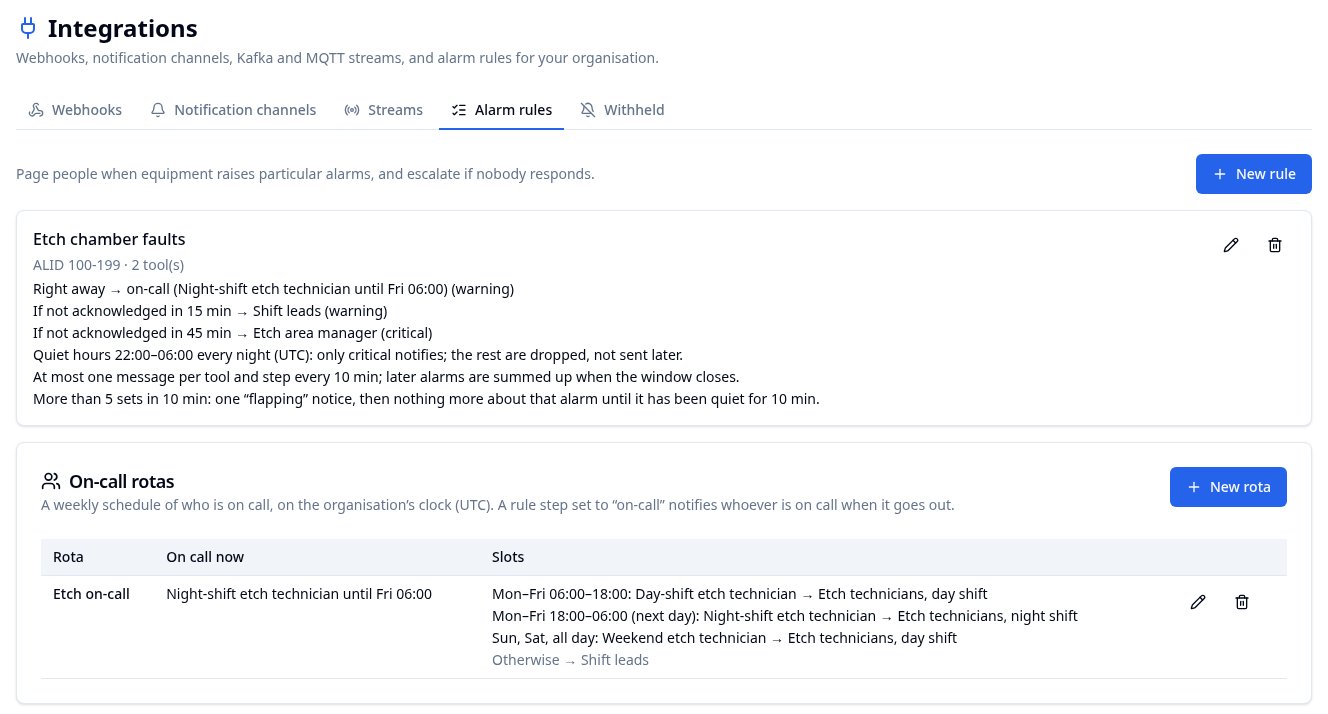
An alarm rule matches alarms by tool, by alarm ID or range of IDs, and by words in the alarm text, and sends them through one or more steps. Each step has a delay and a set of notification channels: Slack, Microsoft Teams or email. A step with no delay is the first page; a step at 15 minutes goes to the shift lead; one at 45 minutes goes to the area manager. Each delay counts from when the alarm was set.
Acknowledging the alarm, or the tool clearing it, stops every step still to come. That is the whole point: escalation should only reach the people further up when the people closer to the tool have not acted.
Steps are kept in the database, not in memory, so a gateway restart or a failover to the standby does not lose an escalation in progress. Only the active gateway sends, and each alarm occurrence is recorded once, so a repeated report from the tool, or a second gateway, does not page anyone twice.
On-call rotas
A step can go to whoever is on call instead of a fixed channel. A rota is a list of time slots: which days, from when to when (a slot can run past midnight), who is on, and which channels reach them. When a step comes due, FabConnect takes the slot that matches the site’s clock at that moment. If no slot matches, the rota’s fallback channels are used. If there is nobody and no fallback, the notice is withheld and the log says why.
The rota is deliberately simple. There is no automatic rotation, swap or override yet: to change who is on, you change the slot. “Who” is a name shown on the message, not a user account.
Quiet hours
Overnight, most alarms can wait for the morning shift and a few cannot. A rule can have quiet hours, for example 22:00 to 06:00 on the site’s time zone. During them only critical notices are sent: those from a critical step, or an alarm the tool itself reported as critical. Everything else is dropped, not saved up and sent at 06:00, because a burst of forty stale messages at the start of a shift is its own way of teaching people to ignore the channel. Every dropped notice is recorded.
Grouping
A tool that is having a bad day raises alarms in clusters. With grouping on, a rule sends at most one message per tool per step within the grouping window, ten minutes for example. The first alarm goes out immediately. The rest are held, and when the window closes one summary follows: how many more alarms that tool raised, each alarm ID with its text and count. The person reading it learns the same thing from one message as from twenty.
Flapping suppression
An alarm that sets and clears over and over, a sensor on the edge of its limit or a loose connector, is the single fastest way to get a channel muted. A rule can say what flapping means for it: more than a given number of sets of one alarm on one tool within a window, five sets in ten minutes for example.
When an alarm crosses that line, one message says it is flapping, and from then on its sets, clears and escalations are held. When it has been quiet for a full window, a second message says it has settled, whether it ended set or cleared, and how many sets were held in the meantime. People hear about the flapping alarm twice, not two hundred times, and still hear about it.
Maintenance and shelving
A tool under maintenance raises alarms that nobody needs to be told about. An operator can put a tool into maintenance for a set time, up to three days by default, or shelve one known alarm on one tool for up to twelve hours. Both need an end time, so nothing is forgotten in maintenance for a month.
This is entirely on FabConnect’s side; nothing is sent to the tool. The alarms are still recorded and shown, marked as under maintenance or shelved, but they do not count as needing attention, and alarm rules and webhooks hold them back. Starting, ending and expiring are all in the audit trail.
The Withheld log
Every rule above throws away notifications on purpose, and a rule that throws away notifications needs to be checkable. Otherwise the first missed alarm becomes an argument about whether the system was working.
So every notice FabConnect holds back is written to the Withheld log, on the Integrations page, with the time, the tool, what was held (a set, clear, escalation, summary and so on), which rule or webhook held it, and why: maintenance, shelved, quiet hours, grouped, flapping, or nobody on call. The reason is in words, such as “quiet hours 22:00-06:00 (Asia/Kolkata): only critical notifies”. The log is kept for 93 days by default.
The reports can then count it: the top-alarms report has a column for how often each alarm was escalated and how often it was withheld by rules, which is how you find the rule that is too quiet as well as the alarm that is too loud. Reports operations actually read covers that report.
Chat cards with an acknowledge link
Messages to Slack and Teams arrive as cards with the rule, the alarm ID, the tool, its severity, the escalation level and who is on call, and two buttons: open the alarm in FabConnect, or acknowledge it. Email carries the same text without buttons.
The acknowledge link is where it would be easy to be careless. Each one is signed, bound to one alarm, usable once, and expires after an hour by default (at most a day). Opening it acknowledges nothing by itself: it opens the alarm in the console, the person signs in if they are not already, and confirms. The acknowledgement is recorded under their own name, and only if their role allows it. A link forwarded to the wrong channel cannot acknowledge an alarm on behalf of someone who was never there.
Both chat cards use the services’ incoming webhooks, so there is no chat app to install. That also means the buttons are links, not interactive buttons inside Slack or Teams.
Ticket webhooks
Some alarms belong in the maintenance ticket system, not in chat. A webhook can be set up as a ticket webhook: when a matching alarm is set, FabConnect posts a JSON body, its default or your own template, to the ticket system’s API, reads the new ticket’s number from the answer, and shows it on the alarm. The format suits ServiceNow, Jira and similar systems; there is no system-specific connector. Deliveries are signed, retried on failure, and held back during maintenance like everything else.
A ticket is opened once, when the alarm is set. Nothing yet closes or updates it when the alarm clears.
What it does not do
- No SMS, phone calls or paging services. Notifications go to Slack, Teams or email.
- No rota rotation, swaps or overrides. A rota is a fixed timetable.
- Quiet hours drop, they do not delay. That is a choice, and it is recorded, but it is worth knowing before you rely on it.
- At most once. If the gateway fails in the instant between taking a step and sending it, that step is not resent.
All of this is covered by automated tests and has run against simulated tools. None of it has yet run in a production fab, and the right thresholds for grouping and flapping are something every fab will set differently.